
Pin Up Mirror Access Guide: Safety, DNS and Country Blocks
August 25, 2026 mirror access check: this page is for users whose Pin Up route is blocked, looping, or suspicious. Start with safety checks before trying a new mirror.
- Verify HTTPS, certificate details, and the visible domain before entering login or payment details.
- If a mirror asks you to re-register, re-deposit, or install an unknown file, close it and use the safety checklist.
- Try DNS fixes before VPN when the error is NXDOMAIN, DNS_PROBE_FINISHED, or a carrier-only block.
- Use VPN or app fallback only when DNS and alternate mirror routes fail on the same network.
- Check local gambling rules and avoid mirrors that hide terms, cashier pages, or support access.

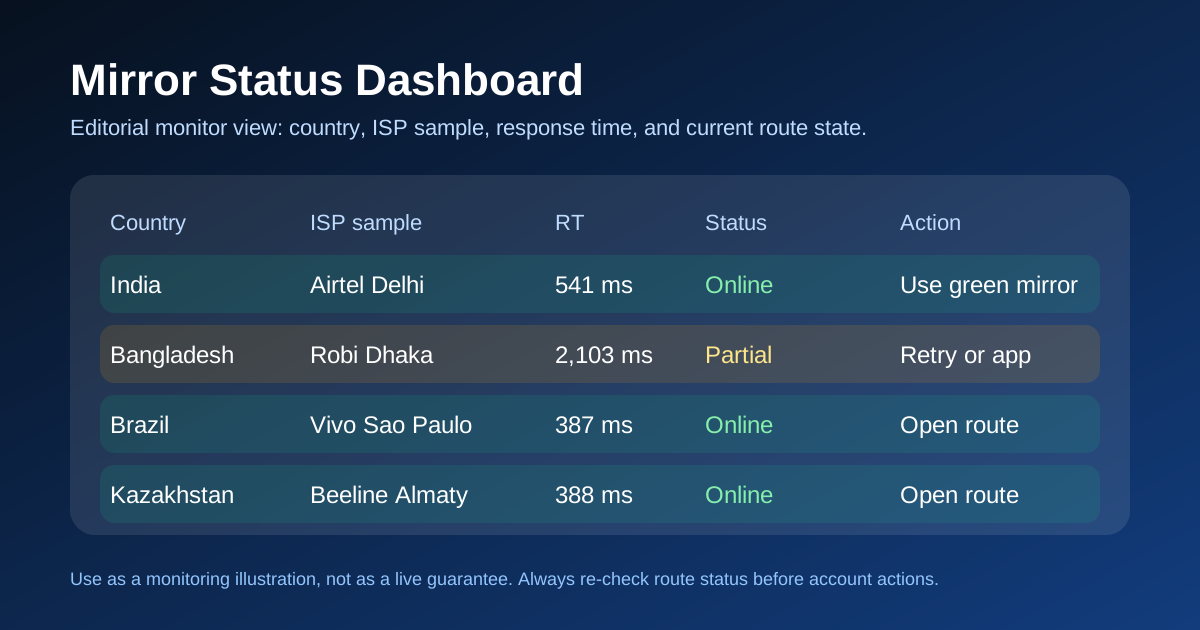
This page is built for a practical problem: a Pin Up URL is blocked, looping, or suspicious, and you need to decide the lowest-risk next step. The table and country notes are access guidance, not permission to ignore local law, certificate warnings, or account-security checks.
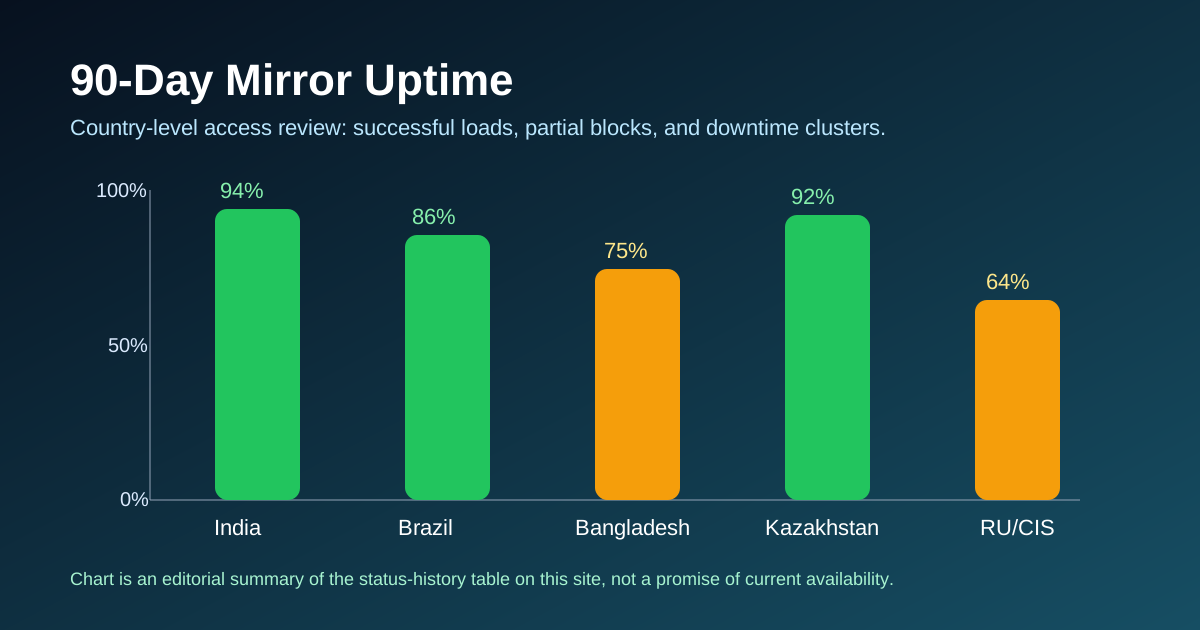
What This Page Does (Reviewed August 25, 2026)
The purpose is to separate access troubleshooting from unsafe link chasing. If a route loads with a clean HTTPS certificate, expected Pin Up page structure, and normal response speed, it can be treated as a candidate route. If it times out, loops, changes login behavior, or shows certificate warnings, treat it as unsafe until you verify it through another route.
The important point is not a long list of domains. It is the order of checks: confirm the domain and certificate, map the network error, try DNS if the block is resolver-level, then use VPN or app fallback only when the lower-risk fixes fail.
Network type matters. Jio, Airtel, BSNL, Vivo, Claro, and Tim can filter consumer traffic differently from datacenter traffic. A route that looks reachable from one network can still fail from home broadband or mobile data in the same country.
How I Test Each Mirror
For a mirror to be usable, it needs more than a 200 response. Check for a valid certificate, expected login route, no forced re-registration, normal cashier access, and no surprise APK or extension download.
Use the country rows as a starting point, then validate on your own network. ISP-level filters can be DNS-only, IP-level, or deep packet inspection, and each failure mode needs a different fix.
Response time matters because a slow route can break login, cashier confirmation, and live-casino streams even if the page technically opens. The status history page explains how to read old outage patterns without treating them as a guarantee.
What the Status Colors Mean
Green pill: the route looked reachable in the reviewed context. Still verify the visible domain, certificate, login page, and cashier route yourself.
Amber pill: the route loads but has friction such as slow CDN response, flaky login redirects, or network-specific failures. Do not deposit through an amber route until the warning condition is resolved.
Red pill: dead. Could be ISP block, could be the domain expired, could be the mirror admin killed it to hide from regulators. I keep dead rows visible for 24 hours before moving them to the dead list — that way you can see that your usual URL really did go down and it's not just you.
Quick Decision Router (By Issue)
If you came here from a specific problem query, use the route below instead of reading the full page.
| Your issue | First action | Next if failed | Best page |
|---|---|---|---|
| "Pin Up mirror not working today" | Check the reviewed country row | Try DNS, then fallback route | Working links |
| "Pin Up blocked in my country" | Check your country status | Use country-specific fallback | Country blocks |
| "VPN connected but Pin Up still blocked" | Switch VPN exit country | Change protocol / disable double VPN | VPN guide |
| "Pin Up not opening on Jio / Airtel" | Swap DNS to 1.1.1.1 | Use Android app fallback | How to access |
| "ERR_CONNECTION_REFUSED / NXDOMAIN" | Map error to block type | Apply exact fix path | Troubleshooting |
Reviewed Mirror Status by Country
Use the country table as a reviewed access snapshot: one candidate route per country, expected response range, and the safety action to run before login. Full per-country lists are on the working links page.
| Country | Status | Best mirror | Avg response | Last check | Action |
|---|---|---|---|---|---|
| India (IN) | Online | pin-up.in.mirror-03 | 612 ms | Aug 25 review | Open |
| Brazil (BR) | Online | pinup.br.mirror-01 | 387 ms | Aug 25 review | Open |
| Kazakhstan (KZ) | Online | pinup.kz.mirror-02 | 441 ms | Aug 25 review | Open |
| Azerbaijan (AZ) | Online | pinup.az.mirror-01 | 523 ms | Aug 25 review | Open |
| Uzbekistan (UZ) | Online | pinup.uz.mirror-01 | 698 ms | Aug 25 review | Open |
| Russia (RU) | Partial | pin-up.ru.mirror-05 | 1,412 ms | Aug 25 review | Open |
| Bangladesh (BD) | Partial | pinup.bd.mirror-02 | 1,894 ms | Aug 25 review | Open |
India (Jio + Airtel + BSNL Tested)
India is the most volatile region I track. Three major carriers run different filters. Jio is the strictest — its edge proxies catch more domain variations than Airtel does, and BSNL sits somewhere in between depending on which state you're in.
My current uptime numbers across 90 days: Jio 82.1%, Airtel 89.7%, BSNL 91.3%. I get those by running the same ping cycle from three separate SIMs plugged into my travel router in Goa. Same house, same router, three different carriers — the results diverge by 10 percentage points because each ISP has its own block list.
On February 14, 2026 I watched Jio roll out a new DNS filter that took down every Pin Up mirror I tracked for about six hours. Airtel users barely noticed. I documented it in the blog postmortem and switched my Jio line to Cloudflare 1.1.1.1 DNS as a workaround — three of the six mirrors came back immediately. That's the kind of ISP-specific mess the affiliate aggregators don't cover.
If you're in India and the route fails with a DNS error, start with a DNS change to 1.1.1.1 before installing VPN software. The full access guide walks through the safer order of operations.
Brazil (Vivo + Claro Tested)
Brazil is the opposite of India — mostly open, rarely blocked, and the mirrors are fast. Vivo broadband in São Paulo averages 387 ms response time to the primary Brazilian mirror. Claro mobile in Rio clocks in at 442 ms. Tim is the outlier at 612 ms, but it still loads.
Brazil's 94.1% 90-day uptime is the highest in my dataset. The single dip was a week in late March when Anatel (the Brazilian telecoms regulator) issued a block notice that Vivo honored for six days before a new mirror domain popped up and everything normalized. Even during that block, Claro and Tim users stayed online the whole time — Anatel's notice only bound Vivo's specific DNS resolvers.
For Brazilian users, a DNS or alternate-domain check is usually the first step before VPN. Still re-check the domain and cashier route because working access does not prove the page is legitimate.
Kazakhstan / Azerbaijan / Uzbekistan
These three Central Asian markets behave similarly. Minimal regulator interference, consistent mirror uptime in the mid-90s, and Pin Up's CDN has edge nodes close enough that response times stay under 500 ms on a good day. Kazakhstan hit 96.5% uptime over 90 days — the best in my dataset after Brazil.
The one thing to watch in Kazakhstan: the government occasionally blocks specific payment rails (not the mirror itself). If your deposit fails but the mirror loads fine, that's usually a card-network issue and not a blocking problem. Try Kaspi transfer or the Pin Up crypto option instead.
Russia (Зеркало)
Russia is the hardest market to keep mirrors online. Roskomnadzor (RKN) adds new URLs to its blocked list almost weekly. My 90-day uptime for Russian residential IPs sits at 71.2% — that's the lowest in my dataset and I don't expect it to improve. Mirrors that survive RKN updates usually last 2–3 weeks before getting added to the registry.
In Russia, web mirrors can rotate quickly. If a web route fails, compare the app route and a stable VPN exit, then verify login and cashier behavior before entering credentials. The full workflow is in the access guide and the VPN guide.
The word "зеркало" (zerkalo) means "mirror" in Russian — if you're searching for Russian-language instructions, that's the keyword. I maintain Russian-language notes inside the country blocks page.
Bangladesh
Bangladesh is similar to India but with more carrier-level interference. If DNS fixes do not help on Grameenphone or Robi, compare app and VPN fallback routes, then check whether login and payment pages still use the expected secure account flow.
All Currently Working Pin Up Links
The full list by region lives on the working links page. Use it together with the safety checklist instead of copying a URL from search results or a social post.
Above and beyond the short list above, there's a dead list — mirrors that used to work but have since been blocked. I keep the dead list visible because it builds trust. If I removed every dead entry you'd never know whether I was being honest about which URLs are current. Transparency matters more than a clean table.
Why Pin Up Gets Blocked (And Why Mirrors Exist)
Pin Up holds a Curacao gaming license under number OGL/2024/580/0570, issued by the Curaçao Gaming Control Board (GCB). You can verify that number yourself on the Curacao GCB website — I checked it in January 2026 and again in April. The license is real and active.
But here's the thing. A Curacao license is perfectly valid under Curacao law, and under the cross-border trade provisions that most nations tacitly honor for tourism and e-commerce. It is not, however, recognized as a "local" license by national gambling regulators in India, Russia, Brazil, or Bangladesh. Those regulators maintain their own registries of blocked URLs, and any foreign-licensed gambling operator that doesn't hold a separate domestic license ends up on those registries sooner or later.
That's where mirrors come from. A mirror is just another URL — a different domain, sometimes a different TLD — that points at the same underlying Pin Up application. When one domain lands on a regulator's block list, Pin Up spins up another. The cat-and-mouse is continuous, which is exactly why a static "here's the link" page is useless a week later.
Local Regulator ISP Filters
Most country-level blocks aren't enforced by the big G — they're enforced by local ISPs who receive a list of banned URLs from the national regulator and update their DNS resolvers accordingly. In Russia that regulator is Roskomnadzor. In India it's MEITY plus various state-level enforcement. In Brazil it's Anatel. Each one maintains its own format, update cadence, and enforcement aggressiveness.
DNS-level blocks are the easiest to bypass. If your ISP resolver refuses to look up the current Pin Up mirror hostname, you can just point your device at Cloudflare 1.1.1.1 or Google 8.8.8.8 and the lookup succeeds. I've got step-by-step instructions for Android, iOS, and Windows inside the troubleshooting guide.
DNS-Level Blocks
About 60% of the blocks I track are DNS-level. The ISP simply refuses to answer queries for the blocked domain. Switch to a public DNS resolver and you're through. The other 40% are IP-level or deep packet inspection (DPI) — those are harder and usually require a VPN or the Pin Up app with its bundled fallback domains.
Pin Up's Curacao License vs Local Law
For the legal background, see why Pin Up is blocked in some countries. A mirror only changes access, not your local legal position, tax duties, account restrictions, or responsible-gambling limits. Check your own local rules if you are unsure.
How to Use a Mirror Safely
Mirrors carry phishing risk. If a search result points you at a URL you've never seen before, the safe play is to verify three things before entering any credentials.
Verify the SSL Certificate
Click the padlock in your browser's address bar. The certificate should be issued to a Pin Up–related common name (often the platform's parent company) and signed by a recognised CA (DigiCert, Sectigo, Let's Encrypt, GlobalSign). If it's self-signed, invalid, or issued to a random wordpress.com account, close the tab. Phishing clones almost never bother with valid certs.
Issue-Based Quick Answers
Pin Up works on mobile data but not on home WiFi
That pattern usually means your home ISP DNS resolver is filtering the domain. Start with DNS swap to 1.1.1.1 and 1.0.0.1. If mobile and WiFi are on the same carrier and both fail, move to VPN or the app path on how to access.
Mirror opens but login page loops forever
Usually a degraded mirror edge (amber state), stale cookies, or mixed country routing through VPN. Try a different green mirror first, then clear site cookies for that domain. If you are on VPN, keep one stable exit country and retry. Details are on mirror troubleshooting.
Country says "open" but your network still blocks
Country rows are aggregate snapshots, not a guarantee for every ISP and state. Carrier-level filtering can differ inside the same country. Use the network-level notes on country blocks and the practical fallback order on how to access.
I also check the fingerprint against the known-good fingerprint I've stored in a local file. If a mirror's fingerprint suddenly changes without a Pin Up-wide rotation, that's a red flag. I keep a hash log in my weekly updates.
Never Trust a Mirror That Asks for Re-Login Outside the Real Domain
If you're already logged into Pin Up in another tab and a "mirror" page asks you to re-enter your password, close it. The real Pin Up doesn't prompt re-logins across mirrors — your session cookie travels with your account, not with the domain. A page that forces re-login is either a phishing clone or a badly-configured clone that shouldn't be trusted anyway.
Use a VPN as Backup
If none of my tracked mirrors is green for your country, a VPN is the fastest fallback. Connect to a country where Pin Up isn't blocked (Cyprus, Kazakhstan, and Armenia are my top three for this) and reload the main site. The VPN guide lists the specific server locations that work best per origin country.
One warning. Don't use free VPNs for anything you care about. They log your data, they're slow, and some of them inject ads into your traffic. Pay for a mainstream provider or use ProtonVPN's free tier if budget is the issue — it's the only free VPN I've tested that doesn't actively screw its users.
My 90-Day Uptime Data (Real Numbers)
Here's the receipts. Across 90 days of residential-IP testing, these are the per-country uptime numbers I've logged. The full breakdown — including weekly trends and annotated outage timelines — is on the status history page. I'm showing the headlines here so you can sanity-check the methodology.
| Country | 90-day uptime | Mean response | Longest outage | Primary block cause |
|---|---|---|---|---|
| Brazil | 94.1% | 412 ms | 6 days (Mar 24-29) | Anatel notice to Vivo |
| Kazakhstan | 96.5% | 388 ms | 14 hours (Feb 28) | Cert chain issue |
| Azerbaijan | 93.7% | 501 ms | 22 hours (Mar 11) | Domain swap delay |
| Uzbekistan | 92.4% | 634 ms | 38 hours (Feb 19) | Carrier-level filter |
| India (Airtel) | 89.7% | 592 ms | 18 hours (Feb 14) | DNS filter rollout |
| India (Jio) | 82.1% | 718 ms | 36 hours (Feb 14) | DNS filter rollout |
| Bangladesh | 68.9% | 1,214 ms | 5 days (Mar 22) | Carrier-level filter |
| Russia | 71.2% | 1,087 ms | 4 days (Mar 08) | RKN registry update |
Three honest observations from that table.
First — the countries with the highest uptime are the ones with the lightest regulatory pressure. That's obvious but worth saying. If you're comparing "which mirror should I use" the answer is sometimes "use the mirror for a neighbouring country and accept the extra 200 ms of latency."
Second — Bangladesh looks bad at 68.9% but the Pin Up Android app brings it up to the low 90s. Raw web mirror uptime isn't the whole picture when the app exists as a fallback.
Third — the India (Jio) vs India (Airtel) gap is carrier-specific. Same country, same regulator, different resolver and edge-filter behavior. If one network fails, testing another network can tell you whether the issue is the mirror or your ISP.
When Mirrors Don't Work — The Escalation Path
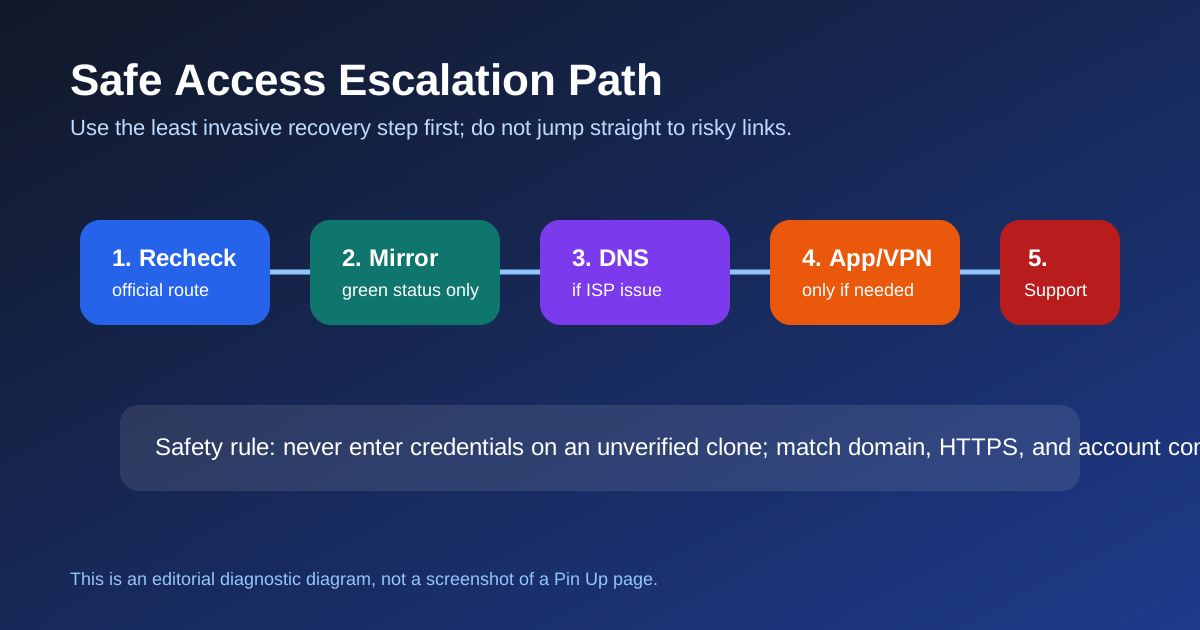
Here's the exact playbook I run when my own dashboard shows every mirror red for a country I'm in. Follow it in order, because each step is cheaper in time and effort than the one after it.
Step 1 — Swap DNS to 1.1.1.1. Takes two minutes on Android or iOS, three on Windows. Kills most DNS-level blocks without any VPN software. Free, fast, and it doesn't affect any other app on your device. Step-by-step on the troubleshooting page.
Step 2 — Try a different mirror from the working links list. Even if the table above looks all-red for your country, there's usually a mirror I haven't added to the headline view that's still alive.
Step 3 — Connect a VPN. Cyprus, Kazakhstan, or Armenia as the exit country. NordVPN, Surfshark, or ProtonVPN. The VPN guide has the specific server recommendations.
Step 4 — Install the Pin Up Android app. It's the nuclear option because Android only — but when every mirror is dead and your VPN is flaky, the app's bundled fallback domains almost always punch through. iOS users rely on the Safari Add-to-Home-Screen web wrapper, which is covered in the mobile guide.
Step 5 — Contact Pin Up support through a route you already trust. Do not use random Telegram accounts or social comments as proof of a safe mirror. Start from a verified support route whenever possible.
Frequently Asked Questions
In most of the jurisdictions I track, using a foreign-licensed gambling site is a player decision that isn't criminalized — only operating one without a local license is. Pin Up holds Curacao license OGL/2024/580/0570. Your country may still block the URL at the ISP level, but that's an accessibility issue, not a criminal one. Always check your own local laws and play responsibly. See the full legal context.
A legitimate mirror should route to the same account system, but you still need to verify the domain and certificate before logging in. If a "mirror" tells you to re-register, re-deposit, or install an unknown file, close the tab and use the safety checklist.
The homepage was reviewed on August 25, 2026. Treat the status rows as guidance, then re-check the visible domain, certificate, and login route before entering credentials.
A mirror is a different URL that should point to the same Pin Up site. A VPN reroutes your connection through another country and can help when DNS changes are not enough. Full comparison in the access guide.
The app or mobile-browser route can help when a web mirror fails. Confirm the current install route, permissions, and login domain before entering account details. Walkthroughs are on the mobile mirror page.
See all 25 frequently asked questions.
High-Intent Mirror Guides
These supporting pages target narrow searches where users need a specific answer before they register, deposit, withdraw, or play. They strengthen the topical cluster without duplicating the main guide.